Index
Constructors
Properties
Methods
Constructors
constructor
-
Parameters
Optionalproperties: Partial<{}>
Returns PathBuilder
Methods
Since 4.14add_
Since 4.14add_
Since 4.14add_
Since 4.14add_
Since 4.14add_
-
Adds a rectangle as a new contour.
The path is going around the rectangle in clockwise direction.
If the the width or height are 0, the path will be a closed horizontal or vertical line. If both are 0, it'll be a closed dot.
Returns void
Since 4.14add_
Since 4.14add_
-
Adds a rounded rectangle as a new contour.
The path is going around the rectangle in clockwise direction.
Parameters
- rect: RoundedRect
the rounded rect
Returns void
- rect: RoundedRect
Since 4.14add_
-
Adds a segment of a path to the builder.
If
startis equal to or afterend, the path will first add the segment fromstartto the end of the path, and then add the segment from the beginning toend. If the path is closed, these segments will be connected.Note that this method always adds a path with the given start point and end point. To add a closed path, use Gsk.PathBuilder.add_path.
Parameters
Returns void
Since 4.14arc_
-
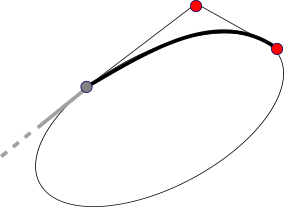
Adds an elliptical arc from the current point to
x2,y2withx1,y1determining the tangent directions.After this,
x2,y2will be the new current point.Note: Two points and their tangents do not determine a unique ellipse, so GSK just picks one. If you need more precise control, use Gsk.PathBuilder.conic_to or Gsk.PathBuilder.svg_arc_to.
Parameters
- x1: number
x coordinate of first control point
- y1: number
y coordinate of first control point
- x2: number
x coordinate of second control point
- y2: number
y coordinate of second control point
Returns void
- x1: number

Since 4.14close
-
Ends the current contour with a line back to the start point.
Note that this is different from calling Gsk.PathBuilder.line_to with the start point in that the contour will be closed. A closed contour behaves differently from an open one. When stroking, its start and end point are considered connected, so they will be joined via the line join, and not ended with line caps.
Returns void
Since 4.14conic_
-
Adds a conic curve from the current point to
x2,y2with the givenweightandx1,y1as the control point.The weight determines how strongly the curve is pulled towards the control point. A conic with weight 1 is identical to a quadratic Bézier curve with the same points.
Conic curves can be used to draw ellipses and circles. They are also known as rational quadratic Bézier curves.
After this,
x2,y2will be the new current point.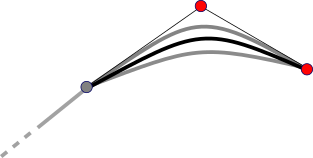
Parameters
- x1: number
x coordinate of control point
- y1: number
y coordinate of control point
- x2: number
x coordinate of the end of the curve
- y2: number
y coordinate of the end of the curve
- weight: number
weight of the control point, must be greater than zero
Returns void
- x1: number

Since 4.14cubic_
-
Adds a cubic Bézier curve from the current point to
x3,y3withx1,y1andx2,y2as the control points.After this,
x3,y3will be the new current point.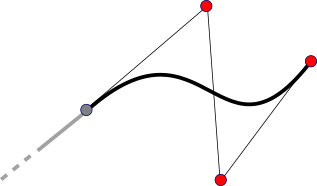
Parameters
- x1: number
x coordinate of first control point
- y1: number
y coordinate of first control point
- x2: number
x coordinate of second control point
- y2: number
y coordinate of second control point
- x3: number
x coordinate of the end of the curve
- y3: number
y coordinate of the end of the curve
Returns void
- x1: number

Since 4.14get_
-
Gets the current point.
The current point is used for relative drawing commands and updated after every operation.
When the builder is created, the default current point is set to
0, 0. Note that this is different from cairo, which starts out without a current point.Returns Graphene.Point
the current point
Since 4.14html_
-
Implements arc-to according to the HTML Canvas spec.
A convenience function that implements the HTML arc_to functionality.
After this, the current point will be the point where the circle with the given radius touches the line from
x1,y1tox2,y2.Parameters
- x1: number
x coordinate of first control point
- y1: number
y coordinate of first control point
- x2: number
x coordinate of second control point
- y2: number
y coordinate of second control point
- radius: number
radius of the circle
Returns void
- x1: number
Since 4.14line_

Since 4.14move_
Since 4.14quad_
-
Adds a quadratic Bézier curve from the current point to
x2,y2withx1,y1as the control point.After this,
x2,y2will be the new current point.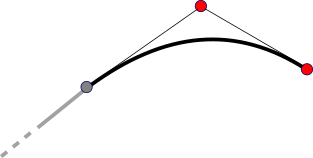
Parameters
- x1: number
x coordinate of control point
- y1: number
y coordinate of control point
- x2: number
x coordinate of the end of the curve
- y2: number
y coordinate of the end of the curve
Returns void
- x1: number

Since 4.14ref
-
Acquires a reference on the given builder.
This function is intended primarily for language bindings. Gsk.PathBuilder objects should not be kept around.
Returns PathBuilder
the given path builder with its reference count increased
Since 4.14rel_
-
Adds an elliptical arc from the current point to
x2,y2withx1,y1determining the tangent directions.All coordinates are given relative to the current point.
This is the relative version of Gsk.PathBuilder.arc_to.
Parameters
- x1: number
x coordinate of first control point
- y1: number
y coordinate of first control point
- x2: number
x coordinate of second control point
- y2: number
y coordinate of second control point
Returns void
- x1: number
Since 4.14rel_
-
Adds a conic curve from the current point to
x2,y2with the givenweightandx1,y1as the control point.All coordinates are given relative to the current point.
This is the relative version of Gsk.PathBuilder.conic_to.
Parameters
- x1: number
x offset of control point
- y1: number
y offset of control point
- x2: number
x offset of the end of the curve
- y2: number
y offset of the end of the curve
- weight: number
weight of the curve, must be greater than zero
Returns void
- x1: number
Since 4.14rel_
-
Adds a cubic Bézier curve from the current point to
x3,y3withx1,y1andx2,y2as the control points.All coordinates are given relative to the current point.
This is the relative version of Gsk.PathBuilder.cubic_to.
Parameters
- x1: number
x offset of first control point
- y1: number
y offset of first control point
- x2: number
x offset of second control point
- y2: number
y offset of second control point
- x3: number
x offset of the end of the curve
- y3: number
y offset of the end of the curve
Returns void
- x1: number
Since 4.14rel_
-
Implements arc-to according to the HTML Canvas spec.
All coordinates are given relative to the current point.
This is the relative version of Gsk.PathBuilder.html_arc_to.
Parameters
- x1: number
x coordinate of first control point
- y1: number
y coordinate of first control point
- x2: number
x coordinate of second control point
- y2: number
y coordinate of second control point
- radius: number
radius of the circle
Returns void
- x1: number
Since 4.14rel_
-
Draws a line from the current point to a point offset from it by
x,yand makes it the new current point.This is the relative version of Gsk.PathBuilder.line_to.
Parameters
- x: number
x offset
- y: number
y offset
Returns void
- x: number
Since 4.14rel_
-
Starts a new contour by placing the pen at
x,yrelative to the current point.This is the relative version of Gsk.PathBuilder.move_to.
Parameters
- x: number
x offset
- y: number
y offset
Returns void
- x: number
Since 4.14rel_
-
Adds a quadratic Bézier curve from the current point to
x2,y2withx1,y1the control point.All coordinates are given relative to the current point.
This is the relative version of Gsk.PathBuilder.quad_to.
Parameters
- x1: number
x offset of control point
- y1: number
y offset of control point
- x2: number
x offset of the end of the curve
- y2: number
y offset of the end of the curve
Returns void
- x1: number
Since 4.14rel_
-
rel_svg_arc_to(
rx: number,
ry: number,
x_axis_rotation: number,
large_arc: boolean,
positive_sweep: boolean,
x: number,
y: number,
): voidImplements arc-to according to the SVG spec.
All coordinates are given relative to the current point.
This is the relative version of Gsk.PathBuilder.svg_arc_to.
Parameters
- rx: number
x radius
- ry: number
y radius
- x_axis_rotation: number
the rotation of the ellipsis
- large_arc: boolean
whether to add the large arc
- positive_sweep: boolean
whether to sweep in the positive direction
- x: number
x coordinate of the endpoint
- y: number
y coordinate of the endpoint
Returns void
- rx: number
Since 4.14svg_
-
svg_arc_to(
rx: number,
ry: number,
x_axis_rotation: number,
large_arc: boolean,
positive_sweep: boolean,
x: number,
y: number,
): voidImplements arc-to according to the SVG spec.
A convenience function that implements the SVG arc_to functionality.
After this,
x,ywill be the new current point.Parameters
- rx: number
x radius
- ry: number
y radius
- x_axis_rotation: number
the rotation of the ellipsis
- large_arc: boolean
whether to add the large arc
- positive_sweep: boolean
whether to sweep in the positive direction
- x: number
x coordinate of the endpoint
- y: number
y coordinate of the endpoint
Returns void
- rx: number
Since 4.14to_
-
Creates a new path from the given builder.
The given Gsk.PathBuilder is reset to the initial state once this function returns. Calling this function again on the same builder instance will therefore produce an empty path, not a copy of the same path.
This function is intended primarily for language bindings. C code should use Gsk.PathBuilder.free_to_path.
Returns Gsk.Path
the newly created path with all the contours added to the builder
Since 4.14unref
Staticnew
-
Returns PathBuilder
Constructs Gsk.Path objects.
A path is constructed like this:
Adding contours to the path can be done in two ways. The easiest option is to use the
gsk_path_builder_add_*group of functions that add predefined contours to the current path, either common shapes like Gsk.PathBuilder.add_circle or by adding from other paths like Gsk.PathBuilder.add_path.The
gsk_path_builder_add_*methods always add complete contours, and do not use or modify the current point.The other option is to define each line and curve manually with the
gsk_path_builder_*_togroup of functions. You start with a call to Gsk.PathBuilder.move_to to set the starting point and then use multiple calls to any of the drawing functions to move the pen along the plane. Once you are done, you can call Gsk.PathBuilder.close to close the path by connecting it back with a line to the starting point.This is similar to how paths are drawn in Cairo.
Note that Gsk.PathBuilder will reduce the degree of added Bézier curves as much as possible, to simplify rendering.
Since
4.14