Hierarchy (View Summary)
Index
Constructors
Properties
Methods
Methods - Inherited from GObject.Object
Constructors
constructor
-
Parameters
Optionalproperties: Partial<Pango.Layout.ConstructorProps>- ...args: any[]
Returns Pango.Layout
Properties
Internal$signals
Compile-time signal type information.
This instance property is generated only for TypeScript type checking. It is not defined at runtime and should not be accessed in JS code.
Static$gtype
Methods
_
-
Parameters
- ...args: any[]
Returns void
Signalconnect
-
connect<K extends keyof Pango.Layout.SignalSignatures>(
signal: K,
callback: SignalCallback<Pango.Layout, Pango.Layout.SignalSignatures[K]>,
): numberType Parameters
- K extends keyof Pango.Layout.SignalSignatures
Parameters
- signal: K
- callback: SignalCallback<Pango.Layout, Pango.Layout.SignalSignatures[K]>
Returns number
Signalconnect_
-
connect_after<K extends keyof Pango.Layout.SignalSignatures>(
signal: K,
callback: SignalCallback<Pango.Layout, Pango.Layout.SignalSignatures[K]>,
): numberType Parameters
- K extends keyof Pango.Layout.SignalSignatures
Parameters
- signal: K
- callback: SignalCallback<Pango.Layout, Pango.Layout.SignalSignatures[K]>
Returns number
context_
-
Forces recomputation of any state in the Pango.Layout that might depend on the layout's context.
This function should be called if you make changes to the context subsequent to creating the layout.
Returns void
copy
-
Creates a deep copy-by-value of the layout.
The attribute list, tab array, and text from the original layout are all copied by value.
Returns Pango.Layout
the newly allocated Pango.Layout
Signalemit
-
emit<K extends keyof Pango.Layout.SignalSignatures>(
signal: K,
...args: GjsParameters<Pango.Layout.SignalSignatures[K]>,
): voidType Parameters
- K extends keyof Pango.Layout.SignalSignatures
Parameters
- signal: K
- ...args: GjsParameters<Pango.Layout.SignalSignatures[K]>
Returns void
get_
get_
Since 1.4get_
-
Gets whether to calculate the base direction for the layout according to its contents.
Returns boolean
trueif the bidirectional base direction is computed from the layout's contents,falseotherwise
Since 1.22get_
Since 1.50get_
-
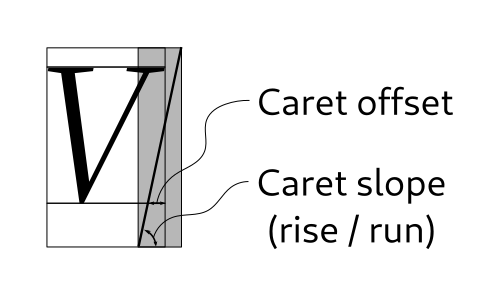
Given an index within a layout, determines the positions that of the strong and weak cursors if the insertion point is at that index.
This is a variant of Pango.Layout.get_cursor_pos that applies font metric information about caret slope and offset to the positions it returns.
Parameters
- index_: number
the byte index of the cursor
Returns [Pango.Rectangle, Pango.Rectangle]
- index_: number

Since 1.30get_
get_
-
Retrieves the Pango.Context used for this layout.
Returns Pango.Context
the Pango.Context for the layout
get_
-
Given an index within a layout, determines the positions that of the strong and weak cursors if the insertion point is at that index.
The position of each cursor is stored as a zero-width rectangle with the height of the run extents.
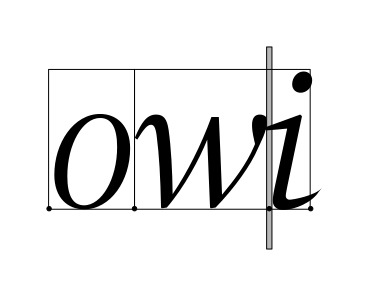
The strong cursor location is the location where characters of the directionality equal to the base direction of the layout are inserted. The weak cursor location is the location where characters of the directionality opposite to the base direction of the layout are inserted.
The following example shows text with both a strong and a weak cursor.
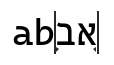
The strong cursor has a little arrow pointing to the right, the weak cursor to the left. Typing a 'c' in this situation will insert the character after the 'b', and typing another Hebrew character, like 'ג', will insert it at the end.
Parameters
- index_: number
the byte index of the cursor
Returns [Pango.Rectangle, Pango.Rectangle]
- index_: number


Since 1.46get_
Since 1.6get_
-
Gets the type of ellipsization being performed for
layout.See Pango.Layout.set_ellipsize.
Use Pango.Layout.is_ellipsized to query whether any paragraphs were actually ellipsized.
Returns Pango.EllipsizeMode
the current ellipsization mode for
layout
get_
-
Computes the logical and ink extents of
layout.Logical extents are usually what you want for positioning things. Note that both extents may have non-zero x and y. You may want to use those to offset where you render the layout. Not doing that is a very typical bug that shows up as right-to-left layouts not being correctly positioned in a layout with a set width.
The extents are given in layout coordinates and in Pango units; layout coordinates begin at the top left corner of the layout.
Returns [Pango.Rectangle, Pango.Rectangle]
Since 1.8get_
-
Gets the font description for the layout, if any.
Returns Pango.FontDescription
a pointer to the layout's font description, or
nullif the font description from the layout's context is inherited.
Since 1.20get_
-
Gets the height of layout used for ellipsization.
See Pango.Layout.set_height for details.
Returns number
the height, in Pango units if positive, or number of lines if negative.
get_
-
Gets the paragraph indent width in Pango units.
A negative value indicates a hanging indentation.
Returns number
the indent in Pango units
get_
-
Returns an iterator to iterate over the visual extents of the layout.
Returns LayoutIter
the new Pango.LayoutIter
get_
-
Gets whether each complete line should be stretched to fill the entire width of the layout.
Returns boolean
the justify value
Since 1.50get_
get_
-
Retrieves a particular line from a Pango.Layout.
Use the faster Pango.Layout.get_line_readonly if you do not plan to modify the contents of the line (glyphs, glyph widths, etc.).
Parameters
- line: number
the index of a line, which must be between 0 and
pango_layout_get_line_count(layout) - 1, inclusive.
Returns LayoutLine
the requested Pango.LayoutLine, or
nullif the index is out of range. This layout line can be ref'ed and retained, but will become invalid if changes are made to the Pango.Layout. - line: number
get_
-
Retrieves the count of lines for the
layout.Returns number
the line count
Since 1.16get_
-
Retrieves a particular line from a Pango.Layout.
This is a faster alternative to Pango.Layout.get_line, but the user is not expected to modify the contents of the line (glyphs, glyph widths, etc.).
Parameters
- line: number
the index of a line, which must be between 0 and
pango_layout_get_line_count(layout) - 1, inclusive.
Returns LayoutLine
the requested Pango.LayoutLine, or
nullif the index is out of range. This layout line can be ref'ed and retained, but will become invalid if changes are made to the Pango.Layout. No changes should be made to the line. - line: number
Since 1.44get_
get_
-
Returns the lines of the
layoutas a list.Use the faster Pango.Layout.get_lines_readonly if you do not plan to modify the contents of the lines (glyphs, glyph widths, etc.).
Returns LayoutLine[]
a GLib.SList containing the lines in the layout. This points to internal data of the Pango.Layout and must be used with care. It will become invalid on any change to the layout's text or properties.
Since 1.16get_
-
Returns the lines of the
layoutas a list.This is a faster alternative to Pango.Layout.get_lines, but the user is not expected to modify the contents of the lines (glyphs, glyph widths, etc.).
Returns LayoutLine[]
a GLib.SList containing the lines in the layout. This points to internal data of the Pango.Layout and must be used with care. It will become invalid on any change to the layout's text or properties. No changes should be made to the lines.
get_
-
Retrieves an array of logical attributes for each character in the
layout.Returns LogAttr[]
Since 1.30get_
-
Retrieves an array of logical attributes for each character in the
layout.This is a faster alternative to Pango.Layout.get_log_attrs. The returned array is part of
layoutand must not be modified. Modifying the layout will invalidate the returned array.The number of attributes returned in
n_attrswill be one more than the total number of characters in the layout, since there need to be attributes corresponding to both the position before the first character and the position after the last character.Returns LogAttr[]
an array of logical attributes
get_
-
Computes the logical and ink extents of
layoutin device units.This function just calls Pango.Layout.get_extents followed by two extents_to_pixels calls, rounding
ink_rectandlogical_rectsuch that the rounded rectangles fully contain the unrounded one (that is, passes them as first argument to Pango.extents_to_pixels).Returns [Pango.Rectangle, Pango.Rectangle]
get_
-
Determines the logical width and height of a Pango.Layout in device units.
Pango.Layout.get_size returns the width and height scaled by
PANGO_SCALE. This is simply a convenience function around Pango.Layout.get_pixel_extents.Returns [number, number]
Since 1.32.4get_
-
Returns the current serial number of
layout.The serial number is initialized to an small number larger than zero when a new layout is created and is increased whenever the layout is changed using any of the setter functions, or the Pango.Context it uses has changed. The serial may wrap, but will never have the value 0. Since it can wrap, never compare it with "less than", always use "not equals".
This can be used to automatically detect changes to a Pango.Layout, and is useful for example to decide whether a layout needs redrawing. To force the serial to be increased, use Pango.Layout.context_changed.
Returns number
The current serial number of
layout.
get_
-
Obtains whether
layoutis in single paragraph mode.Returns boolean
trueif the layout does not break paragraphs at paragraph separator characters,falseotherwise
get_
-
Determines the logical width and height of a Pango.Layout in Pango units.
This is simply a convenience function around Pango.Layout.get_extents.
Returns [number, number]
get_
-
Gets the amount of spacing between the lines of the layout.
Returns number
the spacing in Pango units
get_
-
Gets the current Pango.TabArray used by this layout.
If no Pango.TabArray has been set, then the default tabs are in use and
nullis returned. Default tabs are every 8 spaces.The return value should be freed with Pango.TabArray.free.
Returns TabArray
a copy of the tabs for this layout
get_
-
Gets the text in the layout.
The returned text should not be freed or modified.
Returns string
the text in the
layout
Since 1.16get_
-
Counts the number of unknown glyphs in
layout.This function can be used to determine if there are any fonts available to render all characters in a certain string, or when used in combination with Pango.AttrType.FALLBACK, to check if a certain font supports all the characters in the string.
Returns number
The number of unknown glyphs in
layout
get_
-
Gets the width to which the lines of the Pango.Layout should wrap.
Returns number
the width in Pango units, or -1 if no width set.
get_
-
Gets the wrap mode for the layout.
Use Pango.Layout.is_wrapped to query whether any paragraphs were actually wrapped.
Returns Pango.WrapMode
active wrap mode.
index_
-
Converts from byte
index_within thelayoutto line and X position.The X position is measured from the left edge of the line.
Parameters
- index_: number
the byte index of a grapheme within the layout
- trailing: boolean
an integer indicating the edge of the grapheme to retrieve the position of. If > 0, the trailing edge of the grapheme, if 0, the leading of the grapheme
Returns [number, number]
- index_: number
index_
-
Converts from an index within a Pango.Layout to the onscreen position corresponding to the grapheme at that index.
The returns is represented as rectangle. Note that
pos->xis always the leading edge of the grapheme andpos->x + pos->widththe trailing edge of the grapheme. If the directionality of the grapheme is right-to-left, thenpos->widthwill be negative.Parameters
- index_: number
byte index within
layout
Returns Pango.Rectangle
- index_: number
Since 1.16is_
-
Queries whether the layout had to ellipsize any paragraphs.
This returns
trueif the ellipsization mode forlayoutis not Pango.EllipsizeMode.NONE, a positive width is set onlayout, and there are paragraphs exceeding that width that have to be ellipsized.Returns boolean
trueif any paragraphs had to be ellipsized,falseotherwise
Since 1.16is_
move_
-
move_cursor_visually(
strong: boolean,
old_index: number,
old_trailing: number,
direction: number,
): [number, number]Computes a new cursor position from an old position and a direction.
If
directionis positive, then the new position will cause the strong or weak cursor to be displayed one position to right of where it was with the old cursor position. Ifdirectionis negative, it will be moved to the left.In the presence of bidirectional text, the correspondence between logical and visual order will depend on the direction of the current run, and there may be jumps when the cursor is moved off of the end of a run.
Motion here is in cursor positions, not in characters, so a single call to this function may move the cursor over multiple characters when multiple characters combine to form a single grapheme.
Parameters
- strong: boolean
whether the moving cursor is the strong cursor or the weak cursor. The strong cursor is the cursor corresponding to text insertion in the base direction for the layout.
- old_index: number
the byte index of the current cursor position
- old_trailing: number
if 0, the cursor was at the leading edge of the grapheme indicated by
old_index, if > 0, the cursor was at the trailing edge. - direction: number
direction to move cursor. A negative value indicates motion to the left
Returns [number, number]
- strong: boolean
Since 1.50serialize
-
Serializes the
layoutfor later deserialization via Pango.Layout.deserialize.There are no guarantees about the format of the output across different versions of Pango and Pango.Layout.deserialize will reject data that it cannot parse.
The intended use of this function is testing, benchmarking and debugging. The format is not meant as a permanent storage format.
Parameters
- flags: Pango.LayoutSerializeFlags
Returns GLib.Bytes
a GLib.Bytes containing the serialized form of
layout
set_
-
Sets the alignment for the layout: how partial lines are positioned within the horizontal space available.
The default alignment is Pango.Alignment.LEFT.
Returns void
set_
-
Sets the text attributes for a layout object.
References
attrs, so the caller can unref its reference.Parameters
- attrs: AttrList
Returns void
Since 1.4set_
-
Sets whether to calculate the base direction for the layout according to its contents.
When this flag is on (the default), then paragraphs in
layoutthat begin with strong right-to-left characters (Arabic and Hebrew principally), will have right-to-left layout, paragraphs with letters from other scripts will have left-to-right layout. Paragraphs with only neutral characters get their direction from the surrounding paragraphs.When
false, the choice between left-to-right and right-to-left layout is done according to the base direction of the layout's Pango.Context. (See Pango.Context.set_base_dir).When the auto-computed direction of a paragraph differs from the base direction of the context, the interpretation of Pango.Alignment.LEFT and Pango.Alignment.RIGHT are swapped.
Parameters
- auto_dir: boolean
if
true, compute the bidirectional base direction from the layout's contents
Returns void
- auto_dir: boolean
Since 1.6set_
-
Sets the type of ellipsization being performed for
layout.Depending on the ellipsization mode
ellipsizetext is removed from the start, middle, or end of text so they fit within the width and height of layout set with Pango.Layout.set_width and Pango.Layout.set_height.If the layout contains characters such as newlines that force it to be layed out in multiple paragraphs, then whether each paragraph is ellipsized separately or the entire layout is ellipsized as a whole depends on the set height of the layout.
The default value is Pango.EllipsizeMode.NONE.
See Pango.Layout.set_height for details.
Parameters
- ellipsize: Pango.EllipsizeMode
the new ellipsization mode for
layout
Returns void
- ellipsize: Pango.EllipsizeMode
set_
-
Sets the default font description for the layout.
If no font description is set on the layout, the font description from the layout's context is used.
Parameters
- desc: Pango.FontDescription
the new Pango.FontDescription to unset the current font description
Returns void
- desc: Pango.FontDescription
Since 1.20set_
-
Sets the height to which the Pango.Layout should be ellipsized at.
There are two different behaviors, based on whether
heightis positive or negative.If
heightis positive, it will be the maximum height of the layout. Only lines would be shown that would fit, and if there is any text omitted, an ellipsis added. At least one line is included in each paragraph regardless of how small the height value is. A value of zero will render exactly one line for the entire layout.If
heightis negative, it will be the (negative of) maximum number of lines per paragraph. That is, the total number of lines shown may well be more than this value if the layout contains multiple paragraphs of text. The default value of -1 means that the first line of each paragraph is ellipsized. This behavior may be changed in the future to act per layout instead of per paragraph. File a bug against pango at https://gitlab.gnome.org/gnome/pango if your code relies on this behavior.Height setting only has effect if a positive width is set on
layoutand ellipsization mode oflayoutis not Pango.EllipsizeMode.NONE. The behavior is undefined if a height other than -1 is set and ellipsization mode is set to Pango.EllipsizeMode.NONE, and may change in the future.Parameters
- height: number
the desired height of the layout in Pango units if positive, or desired number of lines if negative.
Returns void
- height: number
set_
-
Sets the width in Pango units to indent each paragraph.
A negative value of
indentwill produce a hanging indentation. That is, the first line will have the full width, and subsequent lines will be indented by the absolute value ofindent.The indent setting is ignored if layout alignment is set to Pango.Alignment.CENTER.
The default value is 0.
Parameters
- indent: number
the amount by which to indent
Returns void
- indent: number
set_
-
Sets whether each complete line should be stretched to fill the entire width of the layout.
Stretching is typically done by adding whitespace, but for some scripts (such as Arabic), the justification may be done in more complex ways, like extending the characters.
Note that this setting is not implemented and so is ignored in Pango older than 1.18.
Note that tabs and justification conflict with each other: Justification will move content away from its tab-aligned positions.
The default value is
false.Also see Pango.Layout.set_justify_last_line.
Parameters
- justify: boolean
whether the lines in the layout should be justified
Returns void
- justify: boolean
Since 1.50set_
-
Sets whether the last line should be stretched to fill the entire width of the layout.
This only has an effect if Pango.Layout.set_justify has been called as well.
The default value is
false.Parameters
- justify: boolean
whether the last line in the layout should be justified
Returns void
- justify: boolean
Since 1.44set_
-
Sets a factor for line spacing.
Typical values are: 0, 1, 1.5, 2. The default values is 0.
If
factoris non-zero, lines are placed so thatbaseline2 = baseline1 + factor * height2where height2 is the line height of the second line (as determined by the font(s)). In this case, the spacing set with Pango.Layout.set_spacing is ignored.
If
factoris zero (the default), spacing is applied as before.Note: for semantics that are closer to the CSS line-height property, see Pango.attr_line_height_new.
Parameters
- factor: number
the new line spacing factor
Returns void
- factor: number
set_
-
Sets the layout text and attribute list from marked-up text.
See Pango Markup).
Replaces the current text and attribute list.
This is the same as Pango.Layout.set_markup_with_accel, but the markup text isn't scanned for accelerators.
Parameters
- markup: string
marked-up text
- length: number
length of marked-up text in bytes, or -1 if
markupisNUL-terminated
Returns void
- markup: string
set_
-
Sets the layout text and attribute list from marked-up text.
See Pango Markup).
Replaces the current text and attribute list.
If
accel_markeris nonzero, the given character will mark the character following it as an accelerator. For example,accel_markermight be an ampersand or underscore. All characters marked as an accelerator will receive a Pango.Underline.LOW attribute, and the first character so marked will be returned inaccel_char. Twoaccel_markercharacters following each other produce a single literalaccel_markercharacter.Parameters
- markup: string
marked-up text (see Pango Markup)
- length: number
length of marked-up text in bytes, or -1 if
markupisNUL-terminated - accel_marker: string
marker for accelerators in the text
Returns string
- markup: string
set_
-
Sets the single paragraph mode of
layout.If
settingistrue, do not treat newlines and similar characters as paragraph separators; instead, keep all text in a single paragraph, and display a glyph for paragraph separator characters. Used when you want to allow editing of newlines on a single text line.The default value is
false.Parameters
- setting: boolean
new setting
Returns void
- setting: boolean
set_
-
Sets the amount of spacing in Pango units between the lines of the layout.
When placing lines with spacing, Pango arranges things so that
line2.top = line1.bottom + spacingThe default value is 0.
Note: Since 1.44, Pango is using the line height (as determined by the font) for placing lines when the line spacing factor is set to a non-zero value with Pango.Layout.set_line_spacing. In that case, the
spacingset with this function is ignored.Note: for semantics that are closer to the CSS line-height property, see Pango.attr_line_height_new.
Parameters
- spacing: number
the amount of spacing
Returns void
- spacing: number
set_
-
Sets the tabs to use for
layout, overriding the default tabs.Pango.Layout will place content at the next tab position whenever it meets a Tab character (U+0009).
By default, tabs are every 8 spaces. If
tabsisnull, the default tabs are reinstated.tabsis copied into the layout; you must free your copy oftabsyourself.Note that tabs and justification conflict with each other: Justification will move content away from its tab-aligned positions. The same is true for alignments other than Pango.Alignment.LEFT.
Parameters
- tabs: TabArray
Returns void
set_
-
Sets the text of the layout.
This function validates
textand renders invalid UTF-8 with a placeholder glyph.Note that if you have used Pango.Layout.set_markup or Pango.Layout.set_markup_with_accel on
layoutbefore, you may want to call Pango.Layout.set_attributes to clear the attributes set on the layout from the markup as this function does not clear attributes.Parameters
- text: string
the text
- length: number
maximum length of
text, in bytes. -1 indicates that the string is nul-terminated and the length should be calculated. The text will also be truncated on encountering a nul-termination even whenlengthis positive.
Returns void
- text: string
set_
-
Sets the width to which the lines of the Pango.Layout should wrap or get ellipsized.
The default value is -1: no width set.
Parameters
- width: number
the desired width in Pango units, or -1 to indicate that no wrapping or ellipsization should be performed.
Returns void
- width: number
set_
-
Sets the wrap mode.
The wrap mode only has effect if a width is set on the layout with Pango.Layout.set_width. To turn off wrapping, set the width to -1.
The default value is Pango.WrapMode.WORD.
Returns void
Since 1.50write_
-
A convenience method to serialize a layout to a file.
It is equivalent to calling Pango.Layout.serialize followed by GLib.file_set_contents.
See those two functions for details on the arguments.
It is mostly intended for use inside a debugger to quickly dump a layout to a file for later inspection.
Parameters
- flags: Pango.LayoutSerializeFlags
- filename: string
the file to save it to
Returns boolean
trueif saving was successful
xy_
-
Converts from X and Y position within a layout to the byte index to the character at that logical position.
If the Y position is not inside the layout, the closest position is chosen (the position will be clamped inside the layout). If the X position is not within the layout, then the start or the end of the line is chosen as described for Pango.LayoutLine.x_to_index. If either the X or Y positions were not inside the layout, then the function returns
false; on an exact hit, it returnstrue.Parameters
- x: number
the X offset (in Pango units) from the left edge of the layout
- y: number
the Y offset (in Pango units) from the top edge of the layout
Returns [boolean, number, number]
trueif the coordinates were inside text,falseotherwise - x: number
StaticSince 1.50deserialize
-
deserialize(
context: Pango.Context,
bytes: Uint8Array<ArrayBufferLike> | GLib.Bytes,
flags: Pango.LayoutDeserializeFlags,
): Pango.LayoutLoads data previously created via Pango.Layout.serialize.
For a discussion of the supported format, see that function.
Note: to verify that the returned layout is identical to the one that was serialized, you can compare
bytesto the result of serializing the layout again.Parameters
Returns Pango.Layout
Staticnew
Methods - Inherited from GObject.Object
bind_
-
bind_property(
source_property: string,
target: GObject.Object,
target_property: string,
flags: GObject.BindingFlags,
): GObject.BindingCreates a binding between
source_propertyonsourceandtarget_propertyontarget.Whenever the
source_propertyis changed thetarget_propertyis updated using the same value. For instance:g_object_bind_property (action, "active", widget, "sensitive", 0);Will result in the "sensitive" property of the widget GObject.Object instance to be updated with the same value of the "active" property of the action GObject.Object instance.
If
flagscontains GObject.BindingFlags.BIDIRECTIONAL then the binding will be mutual: iftarget_propertyontargetchanges then thesource_propertyonsourcewill be updated as well.The binding will automatically be removed when either the
sourceor thetargetinstances are finalized. To remove the binding without affecting thesourceand thetargetyou can just callg_object_unref()on the returned GObject.Binding instance.Removing the binding by calling
g_object_unref()on it must only be done if the binding,sourceandtargetare only used from a single thread and it is clear that bothsourceandtargetoutlive the binding. Especially it is not safe to rely on this if the binding,sourceortargetcan be finalized from different threads. Keep another reference to the binding and useg_binding_unbind()instead to be on the safe side.A GObject.Object can have multiple bindings.
Parameters
- source_property: string
the property on
sourceto bind - target: GObject.Object
the target GObject.Object
- target_property: string
the property on
targetto bind - flags: GObject.BindingFlags
flags to pass to GObject.Binding
Returns GObject.Binding
the GObject.Binding instance representing the binding between the two GObject.Object instances. The binding is released whenever the GObject.Binding reference count reaches zero.
- source_property: string
bind_
-
bind_property_full(
source_property: string,
target: GObject.Object,
target_property: string,
flags: GObject.BindingFlags,
transform_to: Closure<any, any>,
transform_from: Closure<any, any>,
): GObject.BindingCreates a binding between
source_propertyonsourceandtarget_propertyontarget, allowing you to set the transformation functions to be used by the binding.This function is the language bindings friendly version of
g_object_bind_property_full(), usingGClosuresinstead of function pointers.Parameters
- source_property: string
the property on
sourceto bind - target: GObject.Object
the target GObject.Object
- target_property: string
the property on
targetto bind - flags: GObject.BindingFlags
flags to pass to GObject.Binding
- transform_to: Closure<any, any>
a GObject.Closure wrapping the transformation function from the
sourceto thetarget, ornullto use the default - transform_from: Closure<any, any>
a GObject.Closure wrapping the transformation function from the
targetto thesource, ornullto use the default
Returns GObject.Binding
the GObject.Binding instance representing the binding between the two GObject.Object instances. The binding is released whenever the GObject.Binding reference count reaches zero.
- source_property: string
block_
-
Blocks a handler of an instance so it will not be called during any signal emissions
Parameters
- id: number
Handler ID of the handler to be blocked
Returns void
- id: number
disconnect
-
Disconnects a handler from an instance so it will not be called during any future or currently ongoing emissions of the signal it has been connected to.
Parameters
- id: number
Handler ID of the handler to be disconnected
Returns void
- id: number
force_
-
This function is intended for GObject.Object implementations to re-enforce a floating object reference. Doing this is seldom required: all
GInitiallyUnownedsare created with a floating reference which usually just needs to be sunken by callingg_object_ref_sink().Returns void
freeze_
-
Increases the freeze count on
object. If the freeze count is non-zero, the emission of "notify" signals onobjectis stopped. The signals are queued until the freeze count is decreased to zero. Duplicate notifications are squashed so that at most one GObject.Object::notify signal is emitted for each property modified while the object is frozen.This is necessary for accessors that modify multiple properties to prevent premature notification while the object is still being modified.
Returns void
get_
-
Gets a named field from the objects table of associations (see
g_object_set_data()).Parameters
- key: string
name of the key for that association
Returns null
the data if found, or
nullif no such data exists. - key: string
get_
-
Gets a property of an object.
The value can be:
- an empty GObject.Value initialized by G_VALUE_INIT, which will be automatically initialized with the expected type of the property (since GLib 2.60)
- a GObject.Value initialized with the expected type of the property
- a GObject.Value initialized with a type to which the expected type of the property can be transformed
In general, a copy is made of the property contents and the caller is responsible for freeing the memory by calling GObject.Value.unset.
Note that GObject.Object.get_property is really intended for language bindings, GObject.Object.get is much more convenient for C programming.
Parameters
- property_name: string
The name of the property to get
- value: any
Return location for the property value. Can be an empty GObject.Value initialized by G_VALUE_INIT (auto-initialized with expected type since GLib 2.60), a GObject.Value initialized with the expected property type, or a GObject.Value initialized with a transformable type
Returns any
get_
-
This function gets back user data pointers stored via
g_object_set_qdata().Parameters
- quark: number
A GLib.Quark, naming the user data pointer
Returns null
The user data pointer set, or
null - quark: number
getv
-
Gets
n_propertiesproperties for anobject. Obtained properties will be set tovalues. All properties must be valid. Warnings will be emitted and undefined behaviour may result if invalid properties are passed in.Parameters
- names: string[]
the names of each property to get
- values: any[]
the values of each property to get
Returns void
- names: string[]
is_
-
Checks whether
objecthas a floating reference.Returns boolean
trueifobjecthas a floating reference
notify
-
Emits a "notify" signal for the property
property_nameonobject.When possible, eg. when signaling a property change from within the class that registered the property, you should use
g_object_notify_by_pspec()instead.Note that emission of the notify signal may be blocked with
g_object_freeze_notify(). In this case, the signal emissions are queued and will be emitted (in reverse order) wheng_object_thaw_notify()is called.Parameters
- property_name: string
the name of a property installed on the class of
object.
Returns void
- property_name: string
notify_
-
Emits a "notify" signal for the property specified by
pspeconobject.This function omits the property name lookup, hence it is faster than
g_object_notify().One way to avoid using
g_object_notify()from within the class that registered the properties, and usingg_object_notify_by_pspec()instead, is to store the GParamSpec used withg_object_class_install_property()inside a static array, e.g.:typedef enum
{
PROP_FOO = 1,
PROP_LAST
} MyObjectProperty;
static GParamSpec *properties[PROP_LAST];
static void
my_object_class_init (MyObjectClass *klass)
{
properties[PROP_FOO] = g_param_spec_int ("foo", NULL, NULL,
0, 100,
50,
G_PARAM_READWRITE | G_PARAM_STATIC_STRINGS);
g_object_class_install_property (gobject_class,
PROP_FOO,
properties[PROP_FOO]);
}and then notify a change on the "foo" property with:
g_object_notify_by_pspec (self, properties[PROP_FOO]);Parameters
- pspec: GObject.ParamSpec
the GObject.ParamSpec of a property installed on the class of
object.
Returns void
- pspec: GObject.ParamSpec
ref
-
Increases the reference count of
object.Since GLib 2.56, if
GLIB_VERSION_MAX_ALLOWEDis 2.56 or greater, the type ofobjectwill be propagated to the return type (using the GCCtypeof()extension), so any casting the caller needs to do on the return type must be explicit.Returns GObject.Object
the same
object
ref_
-
Increase the reference count of
object, and possibly remove the floating reference, ifobjecthas a floating reference.In other words, if the object is floating, then this call "assumes ownership" of the floating reference, converting it to a normal reference by clearing the floating flag while leaving the reference count unchanged. If the object is not floating, then this call adds a new normal reference increasing the reference count by one.
Since GLib 2.56, the type of
objectwill be propagated to the return type under the same conditions as forg_object_ref().Returns GObject.Object
object
run_
-
Releases all references to other objects. This can be used to break reference cycles.
This function should only be called from object system implementations.
Returns void
set
-
Sets multiple properties of an object at once. The properties argument should be a dictionary mapping property names to values.
Parameters
- properties: { [key: string]: any }
Object containing the properties to set
Returns void
- properties: { [key: string]: any }
set_
-
Each object carries around a table of associations from strings to pointers. This function lets you set an association.
If the object already had an association with that name, the old association will be destroyed.
Internally, the
keyis converted to a GLib.Quark usingg_quark_from_string(). This means a copy ofkeyis kept permanently (even afterobjecthas been finalized) — so it is recommended to only use a small, bounded set of values forkeyin your program, to avoid the GLib.Quark storage growing unbounded.Parameters
- key: string
name of the key
- data: null
data to associate with that key
Returns void
- key: string
set_
-
Sets a property on an object.
Parameters
- property_name: string
The name of the property to set
- value: any
The value to set the property to
Returns void
- property_name: string
steal_
-
Remove a specified datum from the object's data associations, without invoking the association's destroy handler.
Parameters
- key: string
name of the key
Returns null
the data if found, or
nullif no such data exists. - key: string
steal_
-
This function gets back user data pointers stored via
g_object_set_qdata()and removes thedatafrom object without invoking itsdestroy()function (if any was set). Usually, calling this function is only required to update user data pointers with a destroy notifier, for example:void
object_add_to_user_list (GObject *object,
const gchar *new_string)
{
// the quark, naming the object data
GQuark quark_string_list = g_quark_from_static_string ("my-string-list");
// retrieve the old string list
GList *list = g_object_steal_qdata (object, quark_string_list);
// prepend new string
list = g_list_prepend (list, g_strdup (new_string));
// this changed 'list', so we need to set it again
g_object_set_qdata_full (object, quark_string_list, list, free_string_list);
}
static void
free_string_list (gpointer data)
{
GList *node, *list = data;
for (node = list; node; node = node->next)
g_free (node->data);
g_list_free (list);
}Using
g_object_get_qdata()in the above example, instead ofg_object_steal_qdata()would have left the destroy function set, and thus the partial string list would have been freed upong_object_set_qdata_full().Parameters
- quark: number
A GLib.Quark, naming the user data pointer
Returns null
The user data pointer set, or
null - quark: number
stop_
-
Stops a signal's emission by the given signal name. This will prevent the default handler and any subsequent signal handlers from being invoked.
Parameters
- detailedName: string
Name of the signal to stop emission of
Returns void
- detailedName: string
thaw_
-
Reverts the effect of a previous call to
g_object_freeze_notify(). The freeze count is decreased onobjectand when it reaches zero, queued "notify" signals are emitted.Duplicate notifications for each property are squashed so that at most one GObject.Object::notify signal is emitted for each property, in the reverse order in which they have been queued.
It is an error to call this function when the freeze count is zero.
Returns void
unblock_
-
Unblocks a handler so it will be called again during any signal emissions
Parameters
- id: number
Handler ID of the handler to be unblocked
Returns void
- id: number
unref
-
Decreases the reference count of
object. When its reference count drops to 0, the object is finalized (i.e. its memory is freed).If the pointer to the GObject.Object may be reused in future (for example, if it is an instance variable of another object), it is recommended to clear the pointer to
nullrather than retain a dangling pointer to a potentially invalid GObject.Object instance. Useg_clear_object()for this.Returns void
Virtualvfunc_
-
the
constructedfunction is called byg_object_new()as the final step of the object creation process. At the point of the call, all construction properties have been set on the object. The purpose of this call is to allow for object initialisation steps that can only be performed after construction properties have been set.constructedimplementors should chain up to theconstructedcall of their parent class to allow it to complete its initialisation.Returns void
Virtualvfunc_
Virtualvfunc_
-
the
disposefunction is supposed to drop all references to other objects, but keep the instance otherwise intact, so that client method invocations still work. It may be run multiple times (due to reference loops). Before returning,disposeshould chain up to thedisposemethod of the parent class.Returns void
Virtualvfunc_
-
instance finalization function, should finish the finalization of the instance begun in
disposeand chain up to thefinalizemethod of the parent class.Returns void
Virtualvfunc_
Virtualvfunc_
-
Emits a "notify" signal for the property
property_nameonobject.When possible, eg. when signaling a property change from within the class that registered the property, you should use
g_object_notify_by_pspec()instead.Note that emission of the notify signal may be blocked with
g_object_freeze_notify(). In this case, the signal emissions are queued and will be emitted (in reverse order) wheng_object_thaw_notify()is called.Returns void
Virtualvfunc_
-
the generic setter for all properties of this type. Should be overridden for every type with properties. If implementations of
set_propertydon't emit property change notification explicitly, this will be done implicitly by the type system. However, if the notify signal is emitted explicitly, the type system will not emit it a second time.Returns void
watch_
-
This function essentially limits the life time of the
closureto the life time of the object. That is, when the object is finalized, theclosureis invalidated by callingg_closure_invalidate()on it, in order to prevent invocations of the closure with a finalized (nonexisting) object. Also,g_object_ref()andg_object_unref()are added as marshal guards to theclosure, to ensure that an extra reference count is held onobjectduring invocation of theclosure. Usually, this function will be called on closures that use thisobjectas closure data.Parameters
- closure: Closure
GObject.Closure to watch
Returns void
- closure: Closure
Static_
-
Parameters
- klass: any
Returns any
Staticcompat_
-
Parameters
- what: number | bigint
- data: null
Returns number
Staticfind_
Staticinstall_
Staticinstall_
-
Parameters
- property_id: number
the id for the new property
- pspec: GObject.ParamSpec
the GObject.ParamSpec for the new property
Returns void
- property_id: number
Staticinterface_
-
Find the GObject.ParamSpec with the given name for an interface. Generally, the interface vtable passed in as
g_ifacewill be the default vtable fromg_type_default_interface_ref(), or, if you know the interface has already been loaded,g_type_default_interface_peek().Parameters
- g_iface: TypeInterface
any interface vtable for the interface, or the default vtable for the interface
- property_name: string
name of a property to look up.
Returns GObject.ParamSpec
- g_iface: TypeInterface
Staticinterface_
-
Add a property to an interface; this is only useful for interfaces that are added to GObject-derived types. Adding a property to an interface forces all objects classes with that interface to have a compatible property. The compatible property could be a newly created GObject.ParamSpec, but normally
g_object_class_override_property()will be used so that the object class only needs to provide an implementation and inherits the property description, default value, bounds, and so forth from the interface property.This function is meant to be called from the interface's default vtable initialization function (the
class_initmember of GObject.TypeInfo.) It must not be called after afterclass_inithas been called for any object types implementing this interface.If
pspecis a floating reference, it will be consumed.Parameters
- g_iface: TypeInterface
any interface vtable for the interface, or the default vtable for the interface.
- pspec: GObject.ParamSpec
the GObject.ParamSpec for the new property
Returns void
- g_iface: TypeInterface
Staticinterface_
-
Lists the properties of an interface.Generally, the interface vtable passed in as
g_ifacewill be the default vtable fromg_type_default_interface_ref(), or, if you know the interface has already been loaded,g_type_default_interface_peek().Parameters
- g_iface: TypeInterface
any interface vtable for the interface, or the default vtable for the interface
Returns GObject.ParamSpec<unknown>[]
- g_iface: TypeInterface
Staticlist_
Staticnewv
Staticoverride_
-
Parameters
- property_id: number
the new property ID
- name: string
the name of a property registered in a parent class or in an interface of this class.
Returns void
- property_id: number
A Pango.Layout structure represents an entire paragraph of text.
While complete access to the layout capabilities of Pango is provided using the detailed interfaces for itemization and shaping, using that functionality directly involves writing a fairly large amount of code. Pango.Layout provides a high-level driver for formatting entire paragraphs of text at once. This includes paragraph-level functionality such as line breaking, justification, alignment and ellipsization.
A Pango.Layout is initialized with a Pango.Context, UTF-8 string and set of attributes for that string. Once that is done, the set of formatted lines can be extracted from the object, the layout can be rendered, and conversion between logical character positions within the layout's text, and the physical position of the resulting glyphs can be made.
There are a number of parameters to adjust the formatting of a Pango.Layout. The following image shows adjustable parameters (on the left) and font metrics (on the right):
The following images demonstrate the effect of alignment and justification on the layout of text:
It is possible, as well, to ignore the 2-D setup, and simply treat the results of a Pango.Layout as a list of lines.